Most teams do not have a testing problem—they have a feedback problem. Here is a practical guide to building an enterprise QA automation strategy that scales with your product.
📑Table of Contents (14 Sections)Tap to Jump ▾
Table of Contents
Most teams I work with do not have a testing problem. They have a feedback problem. Code gets written, merged, and then sits waiting for someone to confirm it did not break checkout, login, or billing. That wait is where release confidence goes to die, and it is the gap QA automation testing is built to close.

I have seen teams buy a tool, write 400 scripts, and end up slower than before. I have also seen a five-person team ship daily with 90 well-chosen automated checks. The difference was never the tool. It was how they treated automation as part of the software development operating model, tied to the SDLC, release cycles, and the actual cost of a production defect.
Automation earns its keep when it shortens the time between a code change and a trustworthy answer about software quality — everything else is secondary. That framing changes what you build, what you skip, and how you staff it.
What Automated Quality Assurance Solves—and What It Does Not
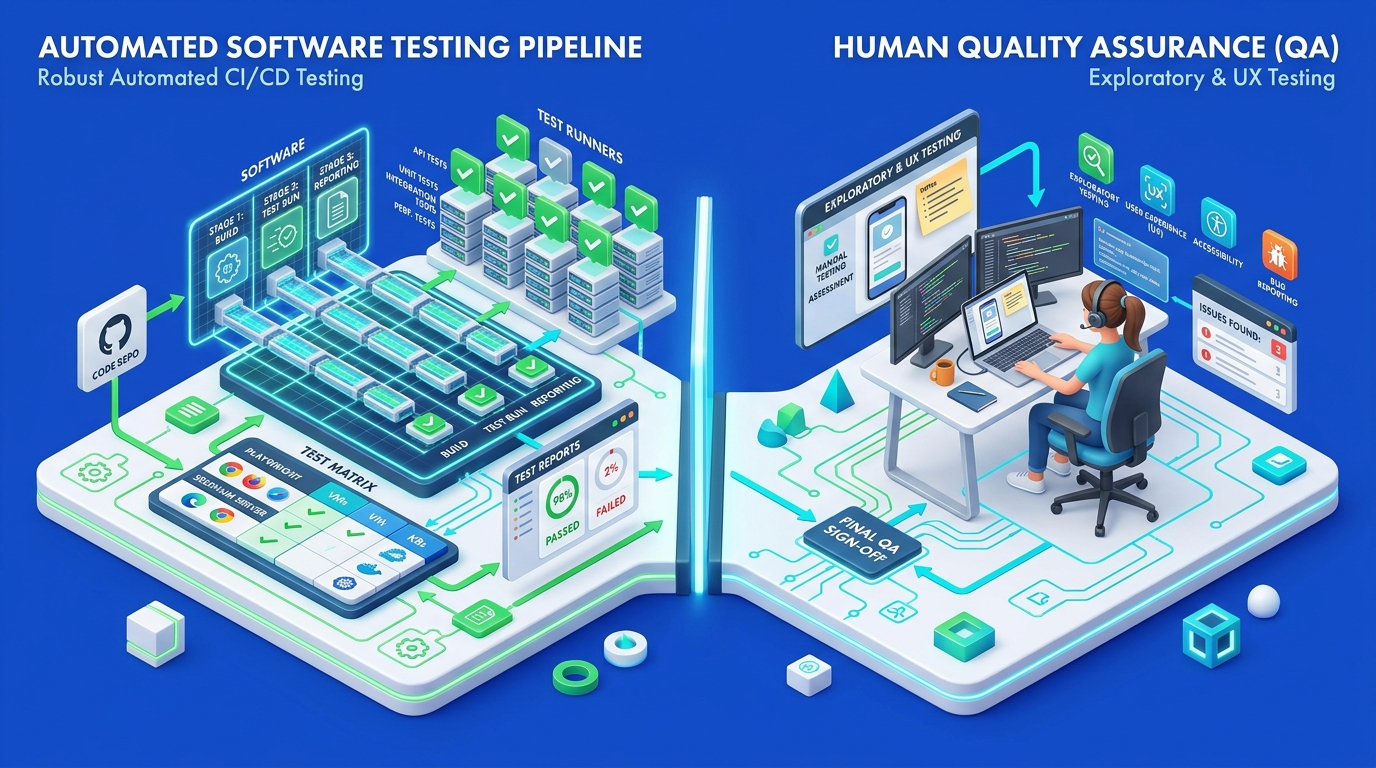
Automated testing solves repetition at scale. When the same 200 test cases must run on every commit, test scripts execute them in minutes with identical steps every time. That consistency is where automated QA testing beats manual effort outright: no skipped steps, no fatigue on the fortieth run, no drift in how a check is performed.
Automation also expands test coverage into places manual work rarely reaches. Running the same suite across browsers, screen sizes, and data sets at once is practical only with scripts. Early bug detection follows naturally — a broken API contract surfaces at 9:14 a.m. instead of during a release-week regression pass.
Here is what automated quality assurance testing does not do. It cannot tell you a screen feels confusing. It cannot follow a hunch. Exploratory testing, ad-hoc testing, and usability testing depend on a person noticing that the flow technically works but the user experience is wrong. I have watched a fully green pipeline ship a checkout page where the total was correct and the button was invisible below the fold.
| Work type | Best handled by |
|---|---|
| Regression checks, repeated every release | Automation |
| Data-driven validation across many inputs | Automation |
| First look at a new feature | Manual, exploratory |
| UX and accessibility judgment | Manual, human review |
| Reproducing a weird customer report | Manual, then automate the fix |
The practical model is a split of labor. Machines confirm what you already know should be true. People investigate what nobody has thought to check yet.
Selecting the Right Tests to Automate First
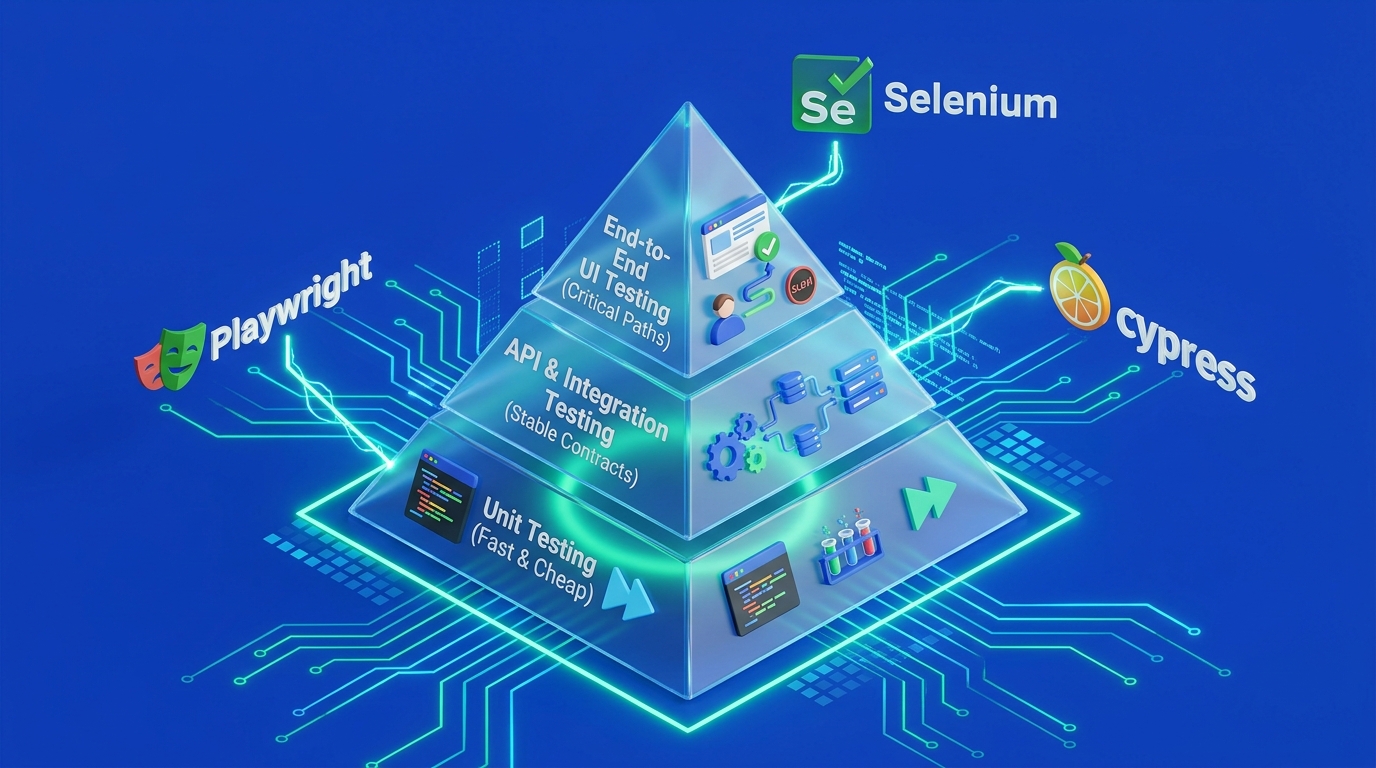
Start with smoke testing on your revenue-critical paths. If sign-in, search, add-to-cart, and payment all pass, you know the build is worth deeper attention. A smoke suite of 10 to 20 automated test cases that runs in under five minutes pays for itself within a month on most teams.
Regression testing comes next, and it should grow from real incidents. Every production bug you fix earns a permanent test. That habit builds a suite grounded in what has broken before, which is a better predictor than guesswork during test planning.
Below the UI layer, weight your investment by cost and stability:
- Unit testing — fast, cheap, owned by developers. Broad coverage here is the foundation.
- API testing — high value per test. Stable contracts, no rendering to wait on. Strong ROI for API and integration testing work.
- Integration testing — validate service boundaries, message queues, and third-party calls.
- End-to-end testing — keep this set small and focused on journeys that generate money or carry legal risk. Our guidance on regression and end-to-end coverage explains where the line usually falls.
- UI testing — the slowest and most brittle layer. Automate the flows you cannot verify any other way.
Functional testing and acceptance testing map cleanly onto this structure. Data-driven testing deserves a specific call-out: when one flow must be validated against 40 combinations of test data, a single parameterized script replaces a full day of manual work.
Performance testing, load testing, and security testing follow a different rhythm. Run them on a schedule and before major releases instead of on every commit, so your main test suite stays fast.
Designing a Test Architecture That Can Scale
Test architecture determines whether your suite survives its second year. The pattern that holds up is layered: a driver layer that talks to the application, a page or service object layer that describes screens and endpoints, and a test layer that reads like business intent. Change a button ID and you edit one file, never fifty. Our notes on framework architecture and page objects go deeper on the structure.
Pick programming languages your engineers already use. A JavaScript team writing Java tests in JUnit or TestNG will produce code that nobody reviews and nobody fixes. Python, C#, JavaScript, and Java all support mature automation frameworks — the deciding factor is who maintains the scripts on a Tuesday afternoon.
A few framework design rules I hold firmly:
- Automation scripts live in the same Git repository as the application code. Version control keeps tests and features moving together, and a pull request that breaks a test fails immediately.
- Every test creates and cleans up its own data. Shared fixtures cause failures that depend on execution order.
- No hardcoded environment values. Configuration belongs in files or environment variables so one suite runs against dev, staging, and production checks.
- Tests must be independent. Any test should run alone, in any order, in parallel.
Test environment stability is the quiet killer. If staging is down twice a week, engineers stop trusting red builds and start ignoring them. Budget for environment reliability the way you budget for the framework itself.
On maintenance: assume roughly 20 to 30 percent of your automation capacity goes to keeping existing tests healthy. Teams that plan for it stay ahead. Teams that treat maintenance as an interruption end up with a suite everyone skips. Sound coding practices apply to test code exactly as they do to production code.
Choosing Tools for Web, Mobile, API, and Performance Testing
Match automation tools to your application landscape, not to popularity rankings. For web automation, Playwright, Cypress, and Selenium cover most needs, and each has a clear profile.
| Tool | Playwright | Cypress | Selenium | Appium |
|---|---|---|---|---|
| Primary use | Web, cross-browser | Web, front-end focused | Web, broad legacy support | Mobile apps |
| Languages | JS/TS, Python, Java, C# | JavaScript/TypeScript | Java, Python, C#, JS, more | Java, Python, JS, C# |
| Browser coverage | Chromium, Firefox, WebKit | Chromium, Firefox, WebKit | All major, via WebDriver protocol | N/A |
| Parallel execution | Built in | Paid tier or custom setup | Selenium Grid | Device farm required |
| Best fit | New suites needing speed | Developer-owned UI tests | Enterprise, wide tool ecosystem | iOS and Android |
Playwright is my default for new browser testing work: fast, auto-waiting, and strong at cross-browser testing out of the box. Our Playwright framework guidance covers setup patterns in detail. Cypress remains a strong fit when front-end developers own the tests and the app is a single-page application. Selenium earns its place in large enterprises with mixed stacks, older browsers, and existing WebDriver protocol investments — Katalon and QTP sit in that same enterprise lineage.
For mobile, Appium handles iOS and Android through one API, which matters when you support both operating systems. Robotium remains an Android-only option for older projects. Real mobile app coverage requires physical devices or a cloud device testing service.
Cloud-based testing through BrowserStack or a self-hosted Selenium Grid solves cross-platform testing scale. Fifty browser and OS combinations become a configuration file. That approach pairs well with visual UI and cross-browser testing checks.
For API work, SoapUI handles SOAP and REST contract validation. Apache JMeter covers load and performance testing when you need to know how the system behaves at 5,000 concurrent users.
Embedding Fast, Reliable Feedback in CI/CD
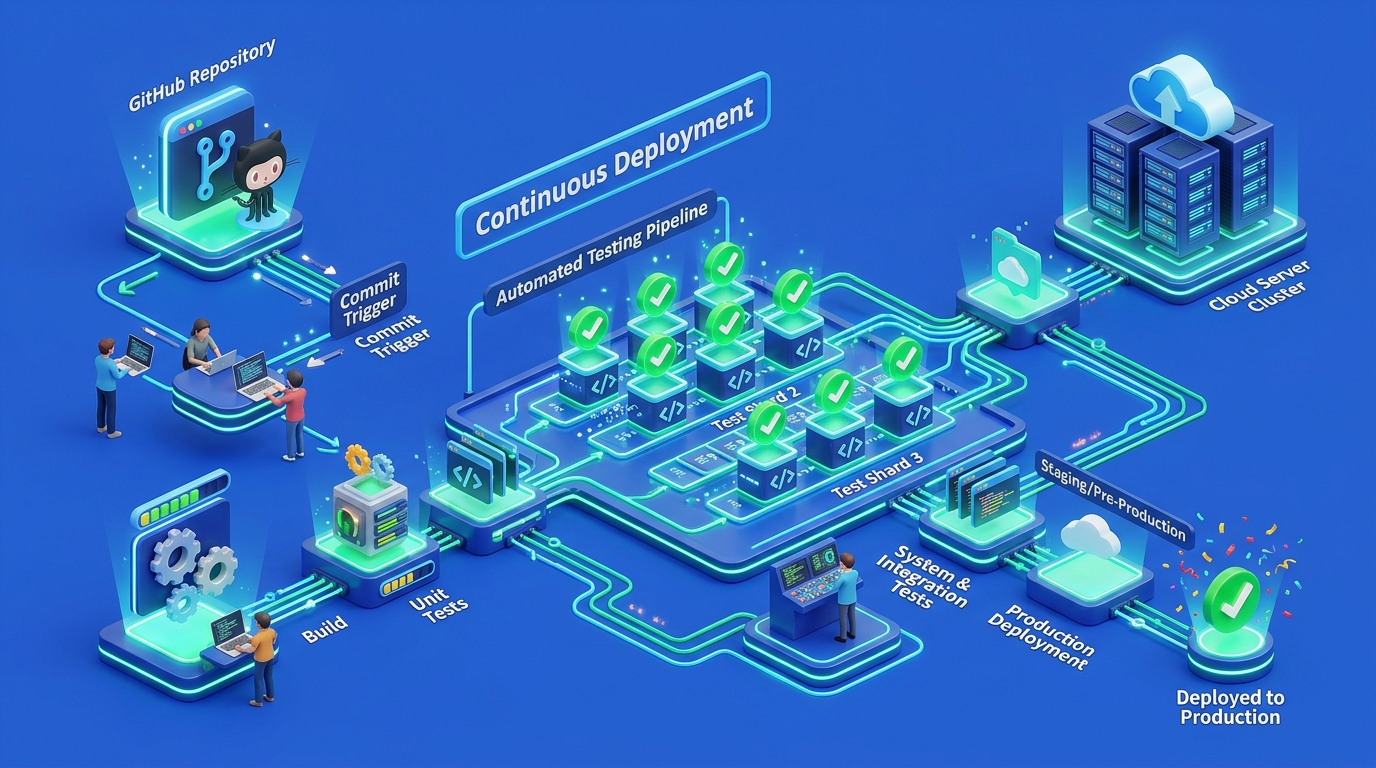
Automation only pays off when tests run automatically on every change. Wire your suite into the CI/CD pipeline so continuous integration triggers the right tests at the right stage, and continuous testing becomes the default state of the codebase.
I structure pipelines in three tiers:
- On every commit — unit tests and linting. Target under three minutes.
- On every pull request — API tests, integration tests, and the smoke suite. Target under ten minutes.
- On merge to main, or nightly — full regression and cross-browser runs.
GitHub Actions and GitLab CI both handle this cleanly with matrix builds. Jenkins remains common in enterprises with self-hosted requirements, and Azure DevOps fits Microsoft-centric shops. The platform matters less than the discipline of keeping pull request feedback fast.
Parallel test execution is the lever that makes this work. A 45-minute suite split across eight workers finishes in six. Most CI platforms support sharding natively, and cloud grids extend it further. We cover configuration patterns in our guide to parallel and cloud CI/CD test execution.
Test reporting deserves real attention. A red build with a stack trace and no context gets ignored. Good reports include the failing step, a screenshot or trace file, and the exact command to reproduce locally. Analytics across runs reveal which tests fail intermittently, which is the data you need to fix flakiness before engineers lose trust.
Quality gates make the pipeline meaningful. Block the merge when the smoke suite fails. Allow warnings for slower, less critical checks. DevOps integration works when the rules are clear and consistent enough that nobody argues about them during a release.
Measuring ROI, Reliability, and Release Risk
Track four numbers and skip the vanity metrics. Test count tells you nothing about software quality; a suite of 2,000 shallow UI assertions can miss more than 80 sharp API checks.
| Metric | What it tells you | A reasonable target |
|---|---|---|
| Feedback time on a pull request | Whether developers can work without waiting | Under 10 minutes |
| Escaped defects per release | Whether coverage matches real risk | Trending down quarter over quarter |
| Flaky test rate | Whether the team trusts the pipeline | Below 2% of runs |
| Manual regression hours per release | Direct engineering time returned | Falling as coverage grows |
Test coverage is worth measuring by risk area, not by percentage. I would take 70 percent coverage concentrated on payments and authentication over 90 percent spread evenly across settings screens.
Bug detection timing carries real money. A defect caught in a pull request costs minutes. The same defect found in production costs an incident call, a hotfix, a customer apology, and the trust that goes with it. Faster release cycles come from that shift, and performance testing results feed the same picture by showing where the system degrades before customers notice it.
Ongoing ownership cost belongs in the calculation. A QA automation engineer's time splits between new coverage and maintenance, and the maintenance share grows with the suite. Our approach to test metrics, maintenance, and governance puts numbers around that.
Capability gaps are worth naming honestly. Bringing in QA automation support makes sense when you need a framework built correctly the first time, when an enterprise QA automation program spans several teams, or when a QA automation consultant can transfer practices your team then owns. Automated QA testing services fit short-term coverage pushes; a permanent hire fits long-term ownership. Our QA automation services strategy resource covers how to structure the engagement.
Avoiding Brittle Tests and Uncontrolled Maintenance Costs
Brittle tests come from three sources: fragile locators, shared state, and timing assumptions. Fix those and maintenance cost drops sharply.
For UI testing, use dedicated test attributes like data-testid on every element you interact with. CSS class names and XPath chains break the moment a designer adjusts the layout. This one change has cut locator-related failures in half on projects I have worked on.
Replace fixed waits with condition-based waits. A sleep(5) either wastes five seconds or fails on a slow day. Waiting for a specific element or network response is both faster and more reliable in browser automation.
Test data discipline prevents the failures that are hardest to debug:
- Each test creates the records it needs and removes them afterward.
- Never depend on data another test produced.
- Seed the test environment from a script that runs before the suite, so any engineer can reproduce a failure locally.
Parallel test execution exposes hidden coupling immediately. If a test passes alone and fails in a parallel run, it shares state with something. Fix it or quarantine it — do not add a retry and move on.
Track flaky tests as work items in Jira like any other defect, with an owner and a due date. A test that fails 5 percent of the time teaches the team to re-run builds instead of reading them.
Delete tests that no longer earn their keep. Every script in Git costs review time and execution time. For cross-browser testing, run the full matrix nightly and one browser on pull requests. Quarterly, review the slowest 10 percent of your suite and decide whether each test still covers a real risk — that review is one of the qa automation best practices with the clearest payoff.
Building Sustainable Quality at Release Speed
Sustainable quality comes from a test automation strategy sized to your team, not from maximum coverage. Start with a smoke suite on critical paths, grow regression coverage from real production incidents, and push validation down to the API and unit layers wherever it fits.
The framework decisions made early — layered architecture, independent tests, data ownership, version control alongside application code — determine whether maintenance stays manageable at year two. Wire the suite into continuous integration so feedback arrives in minutes, and use parallel execution to keep it there as the suite grows. Continuous delivery becomes realistic when the pipeline gives an answer engineers believe.
Keep people on the work that requires judgment. Automation confirms known behavior; testers find what nobody predicted. Measure the program by feedback speed, escaped defects, and hours returned to engineering, and adjust the portfolio when those numbers move the wrong way.
If you are starting from zero, pick your five most valuable user journeys this week, automate them at the API level where possible, and run them on every pull request. That is a working foundation you can build on for years.
Frequently Asked Questions
What is the difference between QA automation testing and manual testing?
QA automation testing uses scripts and tools to run predefined checks repeatedly, while manual testing relies on a person exercising the application directly. Automation excels at regression, data-driven scenarios, and cross-browser runs. Manual testing remains necessary for exploratory work, usability judgment, and investigating unclear customer reports.
Should I choose Playwright, Cypress, or Selenium for web testing?
Playwright is a strong default for new web suites because of its speed, built-in parallel execution, and multi-browser support. Cypress fits teams where front-end developers own the tests in JavaScript. Selenium remains the practical choice for enterprises with legacy browser requirements or existing WebDriver-based infrastructure.
Do I need Appium if I already automate my web app?
You need Appium when you ship native iOS or Android applications, since web automation tools cannot drive native mobile controls. A responsive web app tested in mobile browser viewports does not require it. Appium runs also need real devices or a cloud device farm to be meaningful.
How much of my testing should be automated?
Aim to automate the checks that repeat every release — smoke, regression, API contracts, and data-driven scenarios — which often covers 60 to 80 percent of routine test execution. Leave exploratory testing, new-feature review, and UX evaluation to people. Chasing 100 percent automation raises maintenance cost faster than it raises confidence.
When does it make sense to hire QA automation services?
Bring in QA automation services when you need a framework built correctly from the start, when coverage must expand faster than hiring allows, or when a program spans multiple teams and needs consistent standards. Look for engagements that include knowledge transfer so your team can maintain the suite afterward.

Written by Faisal Rafique
Senior Software Architect engineering scalable Next.js 15 web systems, 60fps Flutter mobile applications, and automated QA testing frameworks.
Have Technical Questions or Architecture Inquiries?
Leave a project inquiry or request an engineering consultation regarding this topic.